Template Marketplace: Design Your Dream Site
Discover how to browse, purchase, and apply professional templates to your Postion site. From free starters to premium designs, find the perfect look for your brand.
Your site's design is the first thing visitors see. The Template Marketplace is your curated shop for professional, high-quality website designs. Whether you're a writer, photographer, or business owner, there's a template built for you.
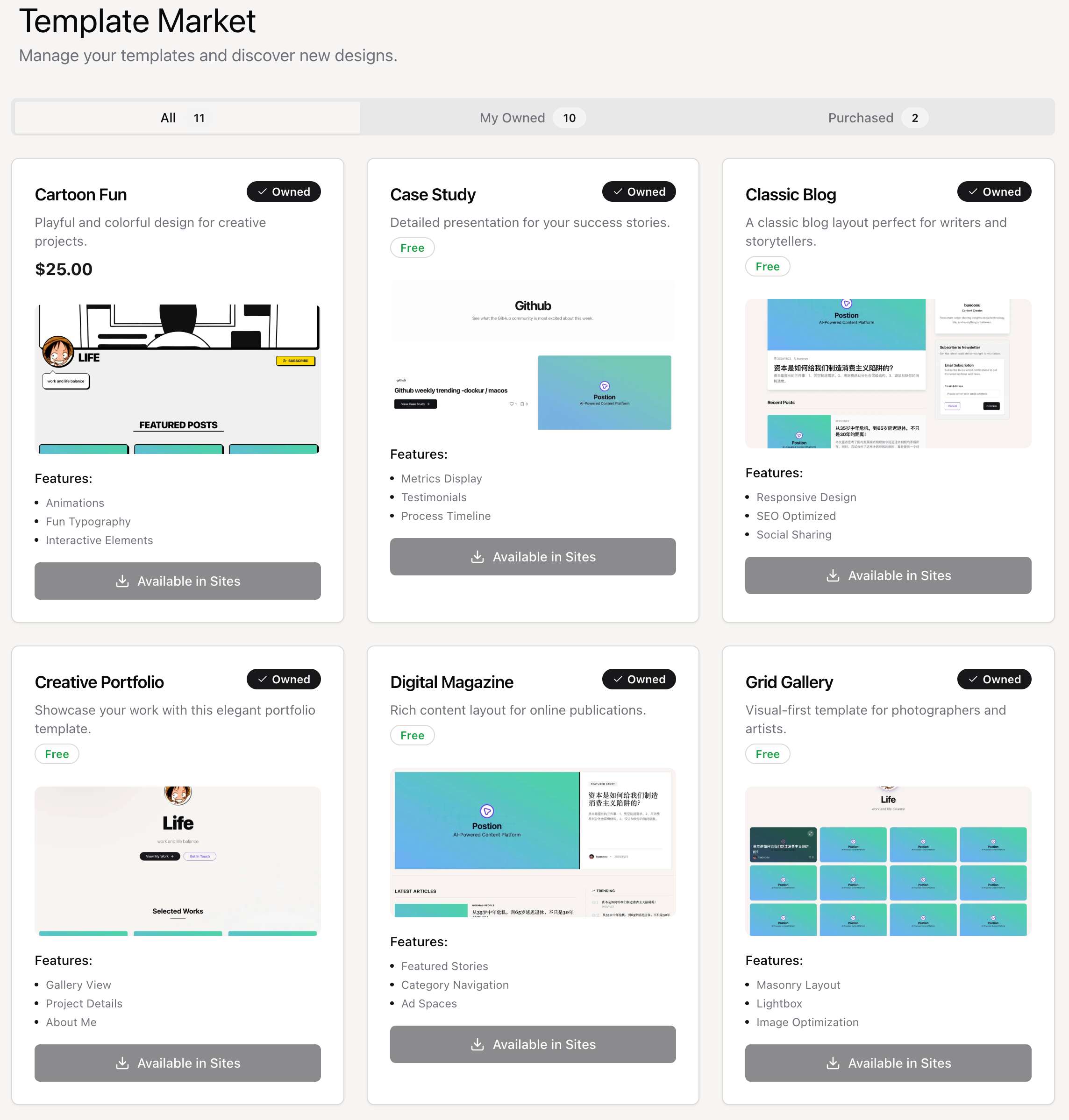
1. Browsing Templates
To explore available designs:
- Go to Marketplace: Click on "Template Market" in the main dashboard sidebar.
- Filter Views: Use the tabs to switch between:
- All: View every available template.
- My Owned: See templates you have already acquired.
- Purchased: View your transaction history.
2. Template Types
We offer two main categories of templates:
Free Templates
These are high-quality, essential designs available to all users at no cost. They are perfect for getting started.
- How to get: Simply select them when creating a site or switch to them in your site settings.
Premium Templates
These are advanced, highly polished designs created by top designers. They often include unique layouts, animations, and specialized features.
- Pricing: Prices vary by template (e.g., $19, $49).
- One-Time Purchase: Once you buy a template, you own it forever and can use it on multiple sites (subject to license terms).
3. Purchasing a Template
- Select a Template: Click on a premium template card to see its details, features, and price.
- Click Purchase: Click the "Purchase" button.
- Complete Payment: You will be redirected to a secure Stripe checkout page.
- Confirmation: After payment, you'll be redirected back to the marketplace. The template will now be marked as "Owned".
4. Applying a Template
Once you own a template (Free or Premium), applying it is easy:
- Create a New Site: During the site creation flow, you will be asked to choose a template. All your owned templates will be available for selection.
- Existing Site:
- Go to your Site Dashboard.
- Navigate to Settings → Appearance.
- Click "Change Template" and select your new design.
5. Previewing Templates
Before purchasing or applying, preview how a template will look with your content.
Preview Features
👁️ Live Preview
See the template with sample content before you buy.
📱 Device Views
Preview on desktop, tablet, and mobile layouts.
Previewing a Template
Click on any template card in the marketplace
View the template details and screenshots
Click "Live Preview" to see an interactive demo
Test navigation, layouts, and responsiveness
6. Template Pricing
Premium templates are priced based on complexity and features.
Pricing Tiers
| Tier | Price Range | What You Get |
|---|---|---|
| Starter | Free | Basic layouts, essential features |
| Standard | $19-29 | Enhanced designs, more customization |
| Premium | $39-59 | Advanced features, animations, unique layouts |
| Designer | $79+ | Exclusive designs, priority support |
What's Included
Every template purchase includes:
- ✅ Lifetime access to the template
- ✅ All future updates to that template
- ✅ Use on multiple sites (per license)
- ✅ Email support for setup questions
7. Template License
Understand what you can do with purchased templates.
License Terms
| Allowed | Not Allowed |
|---|---|
| ✅ Use on your own Postion sites | ❌ Resell or redistribute the template |
| ✅ Customize colors and content | ❌ Use on non-Postion sites |
| ✅ Use for commercial sites | ❌ Claim as your own design |
Multi-Site Usage
- Standard License: Use on up to 3 personal sites
- Extended License: Contact support for agency/unlimited use
All purchases are final. Please preview templates thoroughly before purchasing.
8. Customizing Templates
After applying a template, make it your own.
Customization Options
🎨 Colors
Change primary, secondary, and accent colors to match your brand.
✍️ Fonts
Select from Google Fonts or upload custom typography.
📐 Layout
Adjust header styles, content width, and sidebar position.
Advanced Customization
For users who want more control:
- Custom CSS: Add your own styles to override template defaults
- Component Settings: Many templates have configurable sections
- Logo & Branding: Upload logos and favicons
Access Customization
- Go to Site Dashboard → Appearance
- Click "Customize" next to your current template
- Adjust settings in the visual editor
- Preview changes before saving
- Click "Save" to apply
9. Template Updates
We continuously improve templates with new features and fixes.
How Updates Work
- Automatic: Minor fixes apply automatically
- Optional: Major changes are opt-in to avoid breaking your customizations
- Notified: We'll notify you when updates are available
Updating a Template
- Go to Template Market → My Owned
- Look for templates with an "Update Available" badge
- Click "View Update" to see what's changed
- Click "Apply Update" if you want the new version
Before updating: If you've made significant CSS customizations, back up your custom styles first. Updates may override some custom changes.
10. Selling Your Templates
Are you a designer? You can sell your templates on our marketplace!
Become a Template Creator
Apply to the Template Creator Program
Submit your template for review
Set your pricing (you keep 70% of sales)
Your template goes live in the marketplace
Earn passive income from each sale!
Interested? Contact us at [email protected] to learn more about becoming a template creator.
FAQ
Can I switch templates without losing content?
Yes! Templates only affect the design, not your content. All posts, pages, and settings remain intact.
What if I don't like a template after purchasing?
Purchases are final, but you can always switch back to a previous template. We recommend using the Live Preview extensively before buying.
Do templates include placeholder images?
Yes, templates come with sample content and images for preview. These are replaced with your actual content when applied.